
Web design Melbourne
VisualWeb is a web design studio in Mernda, in Melbourne’s north. For over 20 years we’ve designed, built and looked after fast WordPress and WooCommerce websites for Melbourne small and medium businesses, with every step managed by our own team.
Web design packages start at $1,699 + GST for a complete one-page site. Multi-page business sites are $2,490 to $3,490 + GST and online stores start at $4,990 + GST. Every quote is fixed in writing before we start. On a tighter budget? See our small business website pricing.
Complete one-page Melbourne website
$1,699 + GST, live in a week
- Fixed quotes, no hourly billing
- You own the site and the domain
- Australian hosting available
- Local SEO from day one
What good web design does for a Melbourne business
Good web design isn’t about looking clever. It’s about the handful of things that decide whether a website brings in work.
Tap-to-call on every screen
Most enquiries now start on a phone. Tap-to-call stays locked to the screen so contacting you never depends on someone filling in a form.
A page for every service
One page listing everything you do will not rank. A page per service is what gets you found for the exact thing someone typed into Google.
Real photos, not stock
Your premises, your team, your actual work. Stock photography is the fastest way to look like every other business in your category.
A Google Business Profile that matches
Same business name, address and phone on your site and in Google Maps. Mismatched details are the most common reason a local listing quietly underperforms.
Fast on a phone
Speed is the cheapest competitive advantage on the internet. We build light, avoid bloated page builders where we can.
Enquiries straight to your inbox
No portal, no login, no app to remember. The enquiry lands in the email address you already check and you reply from your phone. After launch, conversion rate optimisation keeps lifting how many arrive.
Our web design process
Four steps from first conversation to launch, with the price agreed before any work starts.
1. A fixed quote, not an estimate
Tell us what you do, who you do it for and what the site needs to achieve. We come back with a fixed price in writing, usually the same or next business day. No discovery workshops and no hourly billing.
2. Design around your customers
We plan the pages around what your customers actually search for: a page per service and a page per suburb where it makes sense. Then we design the look, using your real photos and your brand.
3. Build, write and test
We build in WordPress, write the copy (AI copywriting is included) and test every page on phones, tablets and desktops. Speed, tap-to-call and enquiry forms are checked before anything goes live.
4. Launch and look after it
We launch, connect Google Analytics and Search Console and set up your Google Business Profile details to match. After that, a care plan from $32.95 a month keeps WordPress updated, backed up and secure, or you can run it yourself.
Web design for every kind of Melbourne business
- Trades and construction
- Plumbers
- Electricians
- Landscapers
- Builders and renovators
- Medical and dental clinics
- Physio and allied health
- NDIS providers
- Cafés, restaurants and hospitality
- Retail and local stores
- Hair, beauty and wellness
- Gyms and personal trainers
- Childcare and education
- Real estate agents
- Accountants and bookkeepers
- Legal and professional services
- Manufacturing and wholesale
- Transport and logistics
- Not-for-profits and community groups
- eCommerce and online stores
Not on the list? Call us anyway. What makes a local site work does not change much between industries.
Why choose a Melbourne web design studio
A local team, a fixed price and a website that stays yours.
You deal with the people doing the work
The designer you speak to is the one building your site. No account managers and no ticket queues.
We know the local market
We’ve built for tradies, clinics, gyms and shops across Melbourne’s north and beyond, so we know what local customers expect to see before they call.
You own everything
Domain, hosting and WordPress login stay in your name. No lock-in contracts.
We’re still here after launch
Many of our clients have been with us for years, and more than 1,000 businesses use our hosting and support. Ruby and the team at Covertel have been with us for more than 15 years.
What it costs
Every quote is fixed before we start. All prices exclude GST.
- Full single-page website: all your services on one fast-loading page
- AI Copywriting and imagery included
- Custom enquiry form built to your job type
- Project gallery and customer reviews
- Click-to-call and sticky mobile contact
- Up to 7 pages, individually designed
- A dedicated page per service: better Google coverage
- Location pages for the suburbs you serve
- Local SEO structure: service and suburb pages, schema
- Edit it yourself, or we handle it
- Up to 15 pages
- Online bookings or quote calculator
- Multi-location or multi-team structure
- CRM, email marketing or software integrations
- Advanced SEO structure and schema markup
- WooCommerce store, up to 50 products
- Product and category setup
- Secure Australian payments and shipping rules
- Full checkout testing before launch
- Additional products quoted separately
We’ll create a tailored proposal based on your business goals.
Ongoing care plan
WordPress updates, security, daily backups and uptime monitoring. Monthly content changes are included on our higher care plans.
Fixed before we start. No hourly surprises, no scope creep invoices.
Where we work around Melbourne
We work with businesses right across Melbourne and Australia-wide by phone, email and video. These are the areas we know best.
Across Melbourne
Other suburbs we cover
Not local to us? That is fine: a good chunk of our clients we have never met in person.
Recent Melbourne web design projects
Over 600 websites built and more than 1,000 businesses supported since we started.
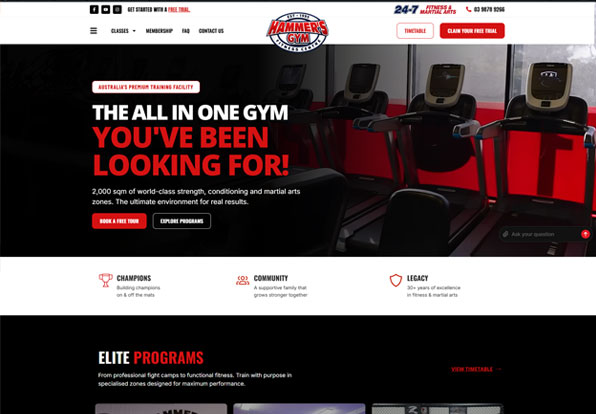
Hammers Gym
New WordPress site for a 2,000 sqm Nunawading gym, with a landing page for each of its 13 disciplines and free trial bookings.
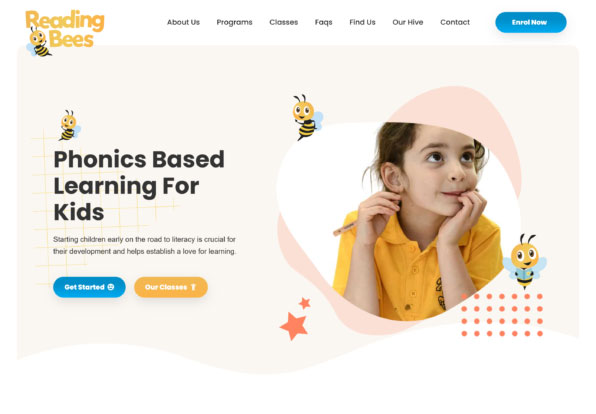
Reading Bees
WordPress site for a children’s literacy business, showing every Melbourne location and letting parents find a class and enrol online.
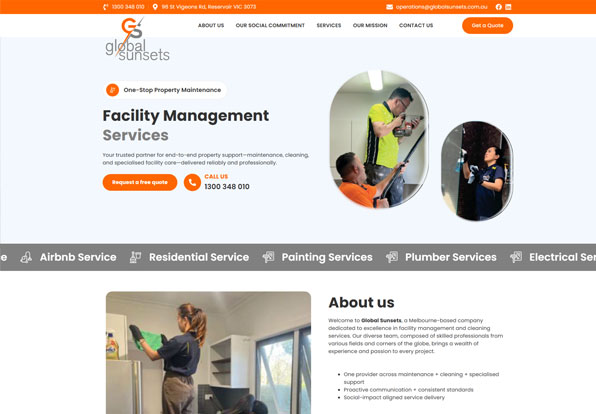
Global Sunsets
Fast, mobile-first WordPress site that sets out eight service lines, from commercial cleaning to compliance, with enquiry forms throughout.
What Melbourne businesses say
Rated 4.9 from 82 Google reviews: tradies, clinics, shops and service businesses across Melbourne.
Web design Melbourne FAQs
A complete one-page site is $1,699 + GST. A small business site of up to seven pages is $2,490 + GST and a larger Business Pro build is $3,490 + GST. An online store starts at $4,990 + GST. Every quote is fixed in writing before any work starts.
Our studio is in Mernda VIC 3754, in Melbourne’s north. Call 1300 144 414 or email info@visualweb.com.au. We are happy to meet in person or work it through by phone and video.
A one-page site can be live in a week. Most small business sites take two to four weeks once we have your content and photos. Larger builds run four to six weeks.
We build every site with a separate page for each service, fast clean markup, correct local signals and a Google Business Profile that matches. For businesses serving multiple areas we build a page per suburb, which is what makes local search work. No one can guarantee a position in Google and we will not.
Yes. We build WooCommerce stores with products loaded, categories organised and a secure payment gateway connected, starting at $4,990 + GST.
Yes. Every site is built in WordPress with a back end you can actually use and we record short how-to videos for your own site. If you would rather not touch it, send the change through and we will do it for you.
Yes. The domain, the hosting account and the WordPress login all stay in your name. If you ever move on, the site goes with you. No lock-in contracts.
If you want us to. Care plans start at $32.95 a month and cover WordPress, theme and plugin updates, daily off-site backups, security monitoring and small content changes. Month to month, cancel any time.
No. Melbourne is home and most of our clients are here, but we build for businesses across Victoria and Australia-wide. A good chunk of our clients we have never met in person.
Design, build, copywriting, mobile and speed testing, an enquiry form, tap-to-call, basic on-page SEO and setup of Google Analytics and Search Console. Hosting and care plans are optional extras. Every inclusion is listed in your fixed quote.
Yes. We rebuild outdated or slow sites on WordPress and keep your existing Google rankings intact with proper redirects. See our website redesign services.
You talk to the person building your site, in your time zone, and they understand local customers and local search. You also get one fixed price up front, rather than a cheap quote that grows.
Ready to get started?
Call us, or send a few details and we will come back with a fixed price. No sales sequence and no discovery workshop.
VisualWeb · Mernda VIC 3754 · 1300 144 414 · info@visualweb.com.au
Nearby areas we serve
We design, host and support WordPress websites for businesses right across the region.