

A Google Business Profile is no longer an option for business. Businesses need to appear higher in the Google search rankings to get noticed by potential clients. COVID-19 has changed many business dynamics. Along with building a strong social media presence, businesses must optimize their search rankings. While developing your website, a brand must ensure that their web design agency in Melbourne gets the website listed on the Google Business profile.
As per Google, 46% of all searches are conducted for local intent and most local searches are looking for the business location.
Google Business Profile can combine search rankings with marketing tactics so that local vendors can draw the maximum benefit by appearing on Google searches.
What is Google Business Profile?
Business owners and marketers can register their business on Google Search and Google Maps. It displays your vital business details like the name of the business, address, hours of operation, contact information, website address and so on. Businesses must double-check all information before posting it as this is how a potential client will contact you. All information must be updated and correct.
Start by creating your Google Business Profile which is complete with all your data information. You can do so by either claiming your page or creating a new one and then verifying it. This is an essential local SEO strategy. Once the listing is complete, customers can easily find you, place orders, or even leave reviews for other users browsing the web.
If you are having trouble listing in the GBP, you can contact our web design team in Melbourne for assistance.
How To Optimise Google Business Profile?
Once you have set up your GBP page, optimize it by filling in all the details. When people find your business online, they click on your business and look for further details. With the competitive business landscape, it is very easy to bleed customers if your basic information is not accurate.
Write a good description relevant to your business and add keywords where possible. You can even add posts to your GBP listing. You just have o follow instructions to create a new post. Thereafter, you will be able to upload an image and write up to 300 words of text or an event title, which should include the start/end date. These posts expire in 7 days. You can periodically update posts, images and videos to make your GBP more engaging.
Customers can add their reviews to your GBP page. Reviews are social proof of your brand and increase your visibility and outreach. Good or bad, you must respond to every review. This makes the customer feel important and they develop a trust in your brand. Reviews also give you an understanding of your customers’ choices. You can update, improvise and improve your business services as per the customer’s liking.
Why you must use Google Business Profile for marketing
Your Google Business profile increases your visibility on the web. Say you are a local ice-cream parlour, catering to your vicinity, listed on Google Business Profile. So the next time when users search for your products or services within your locality, your Google Business Profile page will be displayed among the listings. The information from your page will be shown in the following three different places:
- Google’s sidebar
- Local results
- Google map
When someone searches for a product or service locally, Google displays the first three listings as Google Adwords advertisements, followed by a map with the Local 3-pack, followed by the organic results.
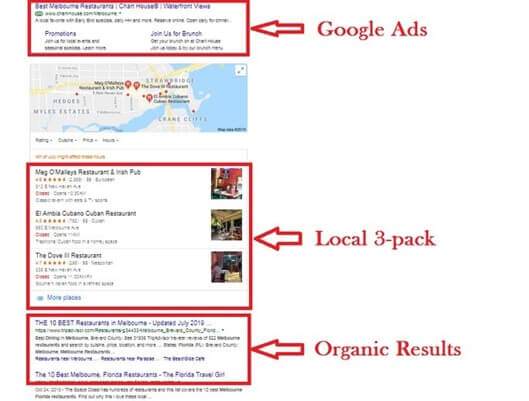
Source: https://www.socialpilot.co/wp-content/uploads/2021/07/google-local-3-pack-1.jpg
The Local 3-pack consists of the top 3 local businesses adhering to the searcher’s location. With a GBP listing, a potential customer directly reaches your shop without even visiting your business website. The once inclusive 7-pack is now limited to only three local listings hence the title 3-pack. Hence a complete and updated GBP can boost a business’s SEO ranking and bring it to the top of the search results.
The GBP listing also gives customers an overview of your business setting an immediate first impression as they can view your business’s essential info listed on the right-hand side of the screen. The google map integration makes it easier for the client to locate your address.
Wrap-up
‘About 60% of smartphone users contacted businesses directly through the GMB interface using the “click to call” option’- Google report
The COVID-19 situation brought GBP into the spotlight. These are unpredictable times when health orders from the authorities are issued from time to time. Businesses have to convey the change of working hours and other information to the clients timely. This is where GBP is very useful. For businesses can convey the changes to their website design team in Melbourne and they will update and optimize your GBP listing.
When you change the business hours on your GBP page, it reflects on your GBP profile immediately. The GMB panel has become the first point of contact between you and your clients. Use it to its maximum advantage for better visibility and engagement.
What a Google Business Profile actually does for you
Your profile is what appears in the local map pack, in Google Maps and in the panel beside search results when someone looks you up by name. For local businesses it is frequently seen more often than the website itself and it is the single highest-return free listing available.
Roughly half of all Google searches carry local intent and a large share of those searchers contact a business the same day. The profile is where that contact happens (a call, a direction request, a booking or a website click) often without the person ever opening your site.
Setting it up properly
- Claim and verify. An unverified or unclaimed listing can be edited by the public and will not rank properly.
- Choose the primary category carefully. It has more influence on local ranking than almost anything else on the profile. Be specific, then add secondary categories.
- Match your NAP exactly. Name, address and phone must be identical here, on your website and across every directory you appear in. Inconsistency dilutes local ranking.
- Use your real business name. Stuffing keywords into the name violates the guidelines and risks suspension.
- Set a service area if you travel to customers and hide the address if you work from home.
- Complete every field. Hours, holiday hours, attributes, payment methods, accessibility, booking links, products and services. Completeness correlates with visibility.
Keeping it working
- Photos matter. Profiles with regularly added, genuine photos get materially more views and clicks than those with stock imagery or none.
- Post updates: offers, news, events. Posts are a small ranking and engagement signal and they keep the profile looking alive.
- Answer questions. The Q&A section is public and anyone can answer it. Seed it with the questions you actually get asked and answer new ones quickly before someone else does it wrong.
- Update hours before holidays. Wrong hours are one of the most common causes of bad reviews.
- Check for unauthorised edits. Google accepts public suggestions; listings do get changed without warning.
Reviews: the part most businesses neglect
Review count, rating and recency all feed local ranking and they are decisive for the customer comparing three profiles. A simple, consistent approach works better than a campaign:
- Ask every satisfied customer, at the moment the job is finished, with a direct review link.
- Never buy reviews or offer incentives. Both breach the guidelines and are increasingly detected.
- Respond to all of them. A calm, specific reply to a negative review reassures far more people than the review itself worries.
- Treat complaints as product feedback. Recurring themes in reviews are usually real.
Our guide to online reviews for small businesses goes further on this.
How the profile and your website work together
The profile gets you found; the website converts. They reinforce each other when your site has a dedicated, genuinely useful page for each main service and location, embedded map and consistent contact details and structured data describing the business. Local SEO work on the site lifts the profile and vice versa; see our local SEO guide for the full picture. Businesses operating from several sites should read optimising profiles for multiple locations.
Frequently asked questions
Is Google Business Profile free?
Yes. Creating, verifying and maintaining a profile costs nothing. Paid options exist for advertising, but the listing itself is free.
Do I need one if I have a website?
Yes and vice versa. They occupy different parts of the search results and reinforce each other. A website without a profile is invisible in the map pack; a profile without a website has nowhere convincing to send people.
Can I have a profile without a shopfront?
Yes. Service-area businesses can list without displaying a street address, which suits tradies, mobile services and home-based operators.
Why has my profile stopped appearing?
Common causes are suspension for guideline breaches such as a keyword-stuffed name or a false address, duplicate listings competing with each other, or unverified changes. Check the account for notifications first, then look for duplicates.
VisualWeb helps Australian businesses set up and optimise their local search presence alongside their website. If your profile is not bringing in calls, get in touch.
Related reading: Google Business Profile Setup Service